Your library, always on.
Surf it like live TV.
Airwave turns your own media into always-on, channel-surfable live TV with a real guide, DVR, and bumpers, streamed straight from your Plex to native apps on every big screen you own.
Surf the guide·1/8
Your library, always on. Surf it like live TV.
Airwave turns your own media into always-on, channel-surfable live TV with a real guide, DVR, and bumpers, streamed straight from your Plex to native apps on every big screen you own.
Surf the guide·1/8
Airwave is a self-hostable service that turns your own Plex library into curated, always-on live TV channels, the broadcast-style guide you leave on, not another grid of posters to scroll. You own the server, the content, and the data.
Self-host
Self-host it in minutes.
One image, two roles, a Postgres. Drop this compose.yaml, point it at your database, and pull updates by re-pulling the tag. No transcoder to babysit. Airwave is the channel brain, your Plex does the streaming.
name: airwave
services:
  postgres:
    image: postgres:16-alpine
    restart: unless-stopped
    environment:
      POSTGRES_USER: ${POSTGRES_USER}
      POSTGRES_PASSWORD: ${POSTGRES_PASSWORD}
      POSTGRES_DB: ${POSTGRES_DB}
      TZ: ${TZ:-UTC}
    volumes:
      - channelguide_pgdata:/var/lib/postgresql/data
      # TrueNAS dataset instead of a named volume? Replace the line above with a
      # bind mount to your dataset, e.g.:
      #   - /mnt/tank/apps/channelguide/pgdata:/var/lib/postgresql/data
    healthcheck:
      test: ["CMD-SHELL", "pg_isready -U ${POSTGRES_USER} -d ${POSTGRES_DB}"]
      interval: 10s
      timeout: 5s
      retries: 10

  server:
    image: ${CG_IMAGE:-ghcr.io/quixomatic/airwave:latest}
    restart: unless-stopped
    depends_on:
      postgres:
        condition: service_healthy
    environment:
      CG_ROLE: server
      PORT: 3000
      # Built from the Postgres settings — points at the postgres service by name.
      DATABASE_URL: postgresql://${POSTGRES_USER}:${POSTGRES_PASSWORD}@postgres:5432/${POSTGRES_DB}?schema=public
      BETTER_AUTH_SECRET: ${BETTER_AUTH_SECRET}
      # Where browsers/TV reach the SERVER, and where the admin web is loaded FROM.
      BETTER_AUTH_URL: ${SERVER_PUBLIC_URL}
      CORS_ORIGIN: ${WEB_PUBLIC_URL}
      # The TV web player's origin, allow-listed for its login flow (empty unless the tvweb
      # service is enabled — see COMPOSE_PROFILES / TV_WEB_PUBLIC_URL in .env).
      TV_APP_ORIGIN: ${TV_WEB_PUBLIC_URL:-}
      # Extra admin origins allow-listed for CORS + auth, beyond CORS_ORIGIN — a comma-separated list
      # (e.g. reach the admin at a LAN IP too when CORS_ORIGIN is a public domain). See .env.example.
      EXTRA_CORS_ORIGINS: ${EXTRA_CORS_ORIGINS:-}
      # Cloud Service (Airwave Cloud remote access) is hidden + inert unless this is 1. Off by default.
      AIRWAVE_CLOUD_SERVICE_ENABLED: ${AIRWAVE_CLOUD_SERVICE_ENABLED:-}
      # Where the connector serves the admin + tv-web over the tunnel (compose service names). Defaults are fine.
      AIRWAVE_WEB_ORIGIN: ${AIRWAVE_WEB_ORIGIN:-http://web:3001}
      AIRWAVE_TVWEB_ORIGIN: ${AIRWAVE_TVWEB_ORIGIN:-http://tvweb:3002}
      ADMIN_EMAIL: ${ADMIN_EMAIL:-}
      ADMIN_PASSWORD: ${ADMIN_PASSWORD:-}
      GOOGLE_CLIENT_ID: ${GOOGLE_CLIENT_ID:-}
      GOOGLE_CLIENT_SECRET: ${GOOGLE_CLIENT_SECRET:-}
      GITHUB_CLIENT_ID: ${GITHUB_CLIENT_ID:-}
      GITHUB_CLIENT_SECRET: ${GITHUB_CLIENT_SECRET:-}
      PLEX_CLIENT_IDENTIFIER: ${PLEX_CLIENT_IDENTIFIER:-}
      # Durable AI-lineup workflow engine — off unless WORKFLOW_ENABLED=1 in .env.
      WORKFLOW_ENABLED: ${WORKFLOW_ENABLED:-}
      WORKFLOW_TARGET_WORLD: ${WORKFLOW_TARGET_WORLD:-@workflow/world-postgres}
      WORKFLOW_LOCAL_BASE_URL: ${WORKFLOW_LOCAL_BASE_URL:-http://127.0.0.1:3152}
      WORKFLOW_POSTGRES_URL: postgresql://${POSTGRES_USER}:${POSTGRES_PASSWORD}@postgres:5432/${POSTGRES_DB}
      # Ambient bumper-music library — FIXED container path. Don't change this; pick the HOST side with
      # BUMPER_MUSIC_VOLUME in the volume mount below.
      BUMPER_MUSIC_DIR: /data/bumper-music
      PUID: ${PUID:-1000}
      PGID: ${PGID:-1000}
      UMASK: ${UMASK:-022}
      TZ: ${TZ:-UTC}
    volumes:
      # Bumper-music audio (persists uploads across updates). The CONTAINER path /data/bumper-music is fixed;
      # choose the HOST side with BUMPER_MUSIC_VOLUME in .env — a Docker named volume (default), or a bind
      # path to your OWN folder/dataset so you can drop tracks in directly (then "Scan folder" on the Bumpers
      # page), e.g.  BUMPER_MUSIC_VOLUME=/mnt/tank/apps/airwave/bumper-music
      - ${BUMPER_MUSIC_VOLUME:-channelguide_bumpermusic}:/data/bumper-music
    ports:
      - "${SERVER_PORT:-36020}:3000"
    healthcheck:
      test: ["CMD-SHELL", "curl -fsS http://localhost:3000/api/health || exit 1"]
      interval: 15s
      timeout: 5s
      retries: 10
      start_period: 60s

  web:
    image: ${CG_IMAGE:-ghcr.io/quixomatic/airwave:latest}
    restart: unless-stopped
    depends_on:
      server:
        condition: service_started
    environment:
      CG_ROLE: web
      WEB_PORT: 3001
      # Baked into the admin build — the address browsers use to reach the server.
      VITE_SERVER_URL: ${SERVER_PUBLIC_URL}
      PUID: ${PUID:-1000}
      PGID: ${PGID:-1000}
      UMASK: ${UMASK:-022}
      TZ: ${TZ:-UTC}
    ports:
      - "${WEB_PORT:-36021}:3001"
    healthcheck:
      # First start compiles the SPA (vite) before serving — allow generous start_period.
      test: ["CMD-SHELL", "curl -fsS http://localhost:3001/ || exit 1"]
      interval: 15s
      timeout: 5s
      retries: 10
      start_period: 180s

  # OPTIONAL — the 10-foot TV app as a browser web player (auth-gated). Off by default; enable it
  # by adding `tvweb` to COMPOSE_PROFILES in .env, and set TV_WEB_PUBLIC_URL (that address is also
  # allow-listed on the server as TV_APP_ORIGIN for the TV login flow).
  tvweb:
    image: ${CG_IMAGE:-ghcr.io/quixomatic/airwave:latest}
    restart: unless-stopped
    profiles: ["tvweb"]
    depends_on:
      server:
        condition: service_started
    environment:
      CG_ROLE: tvweb
      TV_WEB_PORT: 3002
      # Baked into the player build — the address the visitor's BROWSER uses to reach the server.
      # Defaults to the admin's server URL. Override with TV_SERVER_URL to point the player at its
      # OWN public domain (e.g. reverse-proxied at https://airwave-tv…/ with /api forwarded to the
      # server) so the server itself can stay unexposed on the LAN.
      VITE_SERVER_URL: ${TV_SERVER_URL:-${SERVER_PUBLIC_URL}}
      PUID: ${PUID:-1000}
      PGID: ${PGID:-1000}
      UMASK: ${UMASK:-022}
      TZ: ${TZ:-UTC}
    ports:
      - "${TV_WEB_PORT:-36022}:3002"
    healthcheck:
      test: ["CMD-SHELL", "curl -fsS http://localhost:3002/ || exit 1"]
      interval: 15s
      timeout: 5s
      retries: 10
      start_period: 180s

volumes:
  channelguide_pgdata:
  channelguide_bumpermusic:
# ============================================================================
#  Airwave — self-host stack configuration
#  Copy to .env, fill in the values, then deploy (Dockge, or `docker compose up -d`).
# ============================================================================

# --- Image ------------------------------------------------------------------
# The published image to run. Pin a version (e.g. :0.6.30) or track :latest.
CG_IMAGE=ghcr.io/quixomatic/airwave:latest

# --- Where the apps are reachable FROM YOUR BROWSER / TV ---------------------
# CRITICAL: these are baked into the admin build and used for auth + CORS, so they
# must be the addresses your browser and TV actually use — your host's LAN IP or a
# domain, with the PUBLISHED ports below. Do NOT use "localhost" unless you only
# ever browse from the host machine itself.
#
#   SERVER_PUBLIC_URL — where the API/server is reachable (also the TV's server URL)
#   WEB_PUBLIC_URL    — where the admin web is reachable
SERVER_PUBLIC_URL=http://192.168.1.10:36020
WEB_PUBLIC_URL=http://192.168.1.10:36021

# Extra admin origins to allow-list for CORS + auth, beyond WEB_PUBLIC_URL. Comma-separated exact
# origins (scheme + host + port, no trailing slash). Use it when the admin is reachable at more than
# one address — e.g. WEB_PUBLIC_URL is a public HTTPS domain but you also open the admin over the LAN:
#   EXTRA_CORS_ORIGINS=http://192.168.1.10:36021
# Note: a LAN-IP origin calling an HTTPS API is genuinely cross-site, so it relies on third-party
# cookies (the auth cookie is already SameSite=None;Secure on an HTTPS server). Works today; the
# clean long-term path is to reach the admin at its own domain.
# EXTRA_CORS_ORIGINS=

# --- Published host ports (host side -> fixed container side) ----------------
SERVER_PORT=36020    # -> container 3000  (must match SERVER_PUBLIC_URL's port)
WEB_PORT=36021       # -> container 3001  (must match WEB_PUBLIC_URL's port)

# --- Postgres ---------------------------------------------------------------
POSTGRES_USER=channelguide
POSTGRES_PASSWORD=change-me-please
POSTGRES_DB=channelguide

# --- Auth / security --------------------------------------------------------
# 32+ character random secret. Generate one with:  openssl rand -base64 48
BETTER_AUTH_SECRET=change-me-to-a-long-random-string-at-least-32-chars

# First admin account, seeded on first boot (optional but recommended).
ADMIN_EMAIL=admin@example.com
ADMIN_PASSWORD=change-me

# --- Runtime user / timezone (TrueNAS datasets) -----------------------------
PUID=1000
PGID=1000
UMASK=022
TZ=UTC

# --- Optional: bumper ambient music -----------------------------------------
# The bumper-music library persists via a volume mounted at the FIXED container path /data/bumper-music
# (BUMPER_MUSIC_DIR in the server env — leave it alone). Choose only the HOST side here. Unset = a Docker
# named volume (channelguide_bumpermusic). To manage the files from your host — drop tracks in and hit
# "Scan folder" on the Bumpers page — set a bind path to your own folder/dataset instead:
# BUMPER_MUSIC_VOLUME=/mnt/tank/apps/airwave/bumper-music

# --- Optional: TV web player (browser) --------------------------------------
# The 10-foot TV app, served as an auth-gated browser web player. Off by default.
# To enable it: uncomment COMPOSE_PROFILES, and set the public URL + published port.
# TV_WEB_PUBLIC_URL is also allow-listed on the server (as TV_APP_ORIGIN) for the TV
# login flow — so it must be the address browsers actually reach the player at.
# (The installed webOS/Tizen app needs none of this — it's bearer-auth, origin-agnostic.)
# COMPOSE_PROFILES=tvweb
# TV_WEB_PUBLIC_URL=http://192.168.1.10:36022
# TV_WEB_PORT=36022    # -> container 3002
# By default the player talks to the same server URL as the admin (SERVER_PUBLIC_URL). If you
# reverse-proxy the player at its own public domain with /api + /img forwarded to the server, set
# the player's server URL to that same domain — then the server never needs to be exposed:
# TV_SERVER_URL=https://airwave-tv.turboforge.io

# --- Optional: social OAuth (set BOTH id + secret to enable a provider) -----
# GOOGLE_CLIENT_ID=
# GOOGLE_CLIENT_SECRET=
# GITHUB_CLIENT_ID=
# GITHUB_CLIENT_SECRET=

# --- Optional: stable Plex client identifier --------------------------------
# PLEX_CLIENT_IDENTIFIER=

# --- Optional: durable AI-lineup workflow engine ----------------------------
# Off by default. Uncomment to enable the AI lineup builder's workflow engine.
# (Its Postgres connection is derived from the Postgres settings above.)
# WORKFLOW_ENABLED=1

# --- Optional: Cloud Service (Airwave Cloud remote access) -------------------
# Reach this server from anywhere at your own airwave.software subdomain (no port-forwarding), via an
# Airwave Cloud account. Hidden by default. Uncomment to expose the "Cloud Service" section in the admin.
# AIRWAVE_CLOUD_SERVICE_ENABLED=1
# The connector serves the admin + tv-web over the tunnel by forwarding to those services on the compose
# network. The defaults below already point at the web / tvweb services — only override if you renamed them.
# AIRWAVE_WEB_ORIGIN=http://web:3001
# AIRWAVE_TVWEB_ORIGIN=http://tvweb:3002
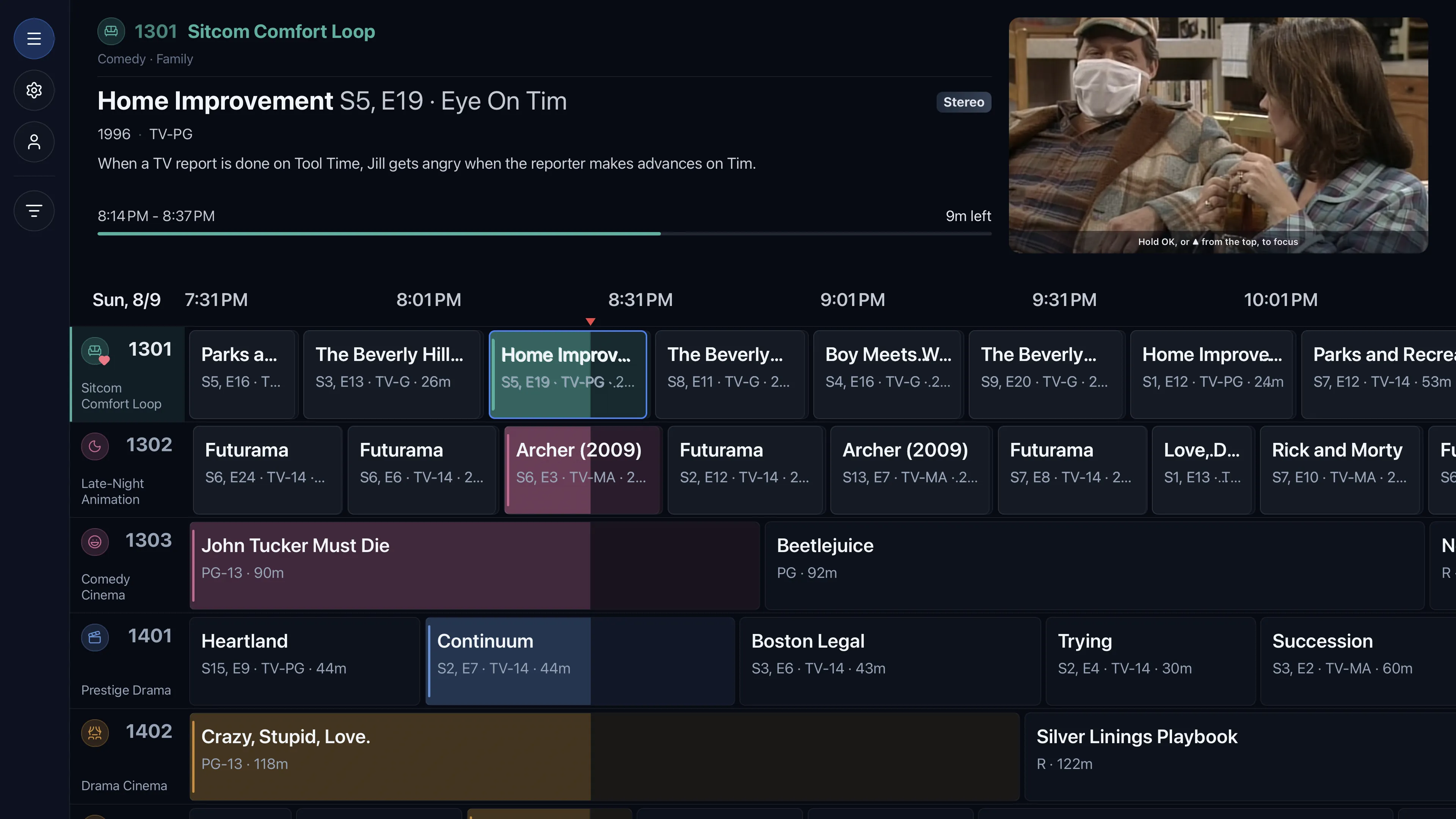
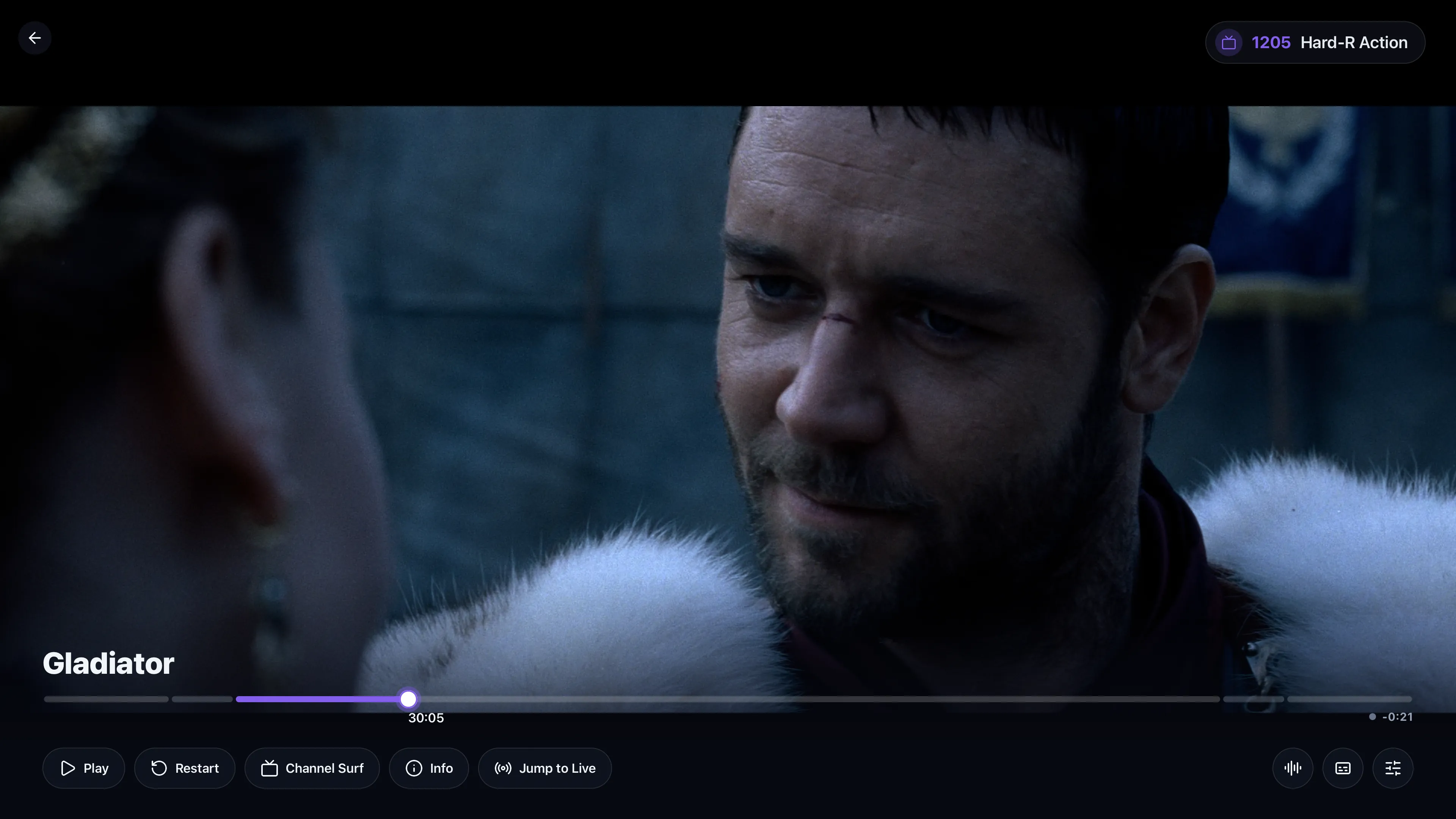
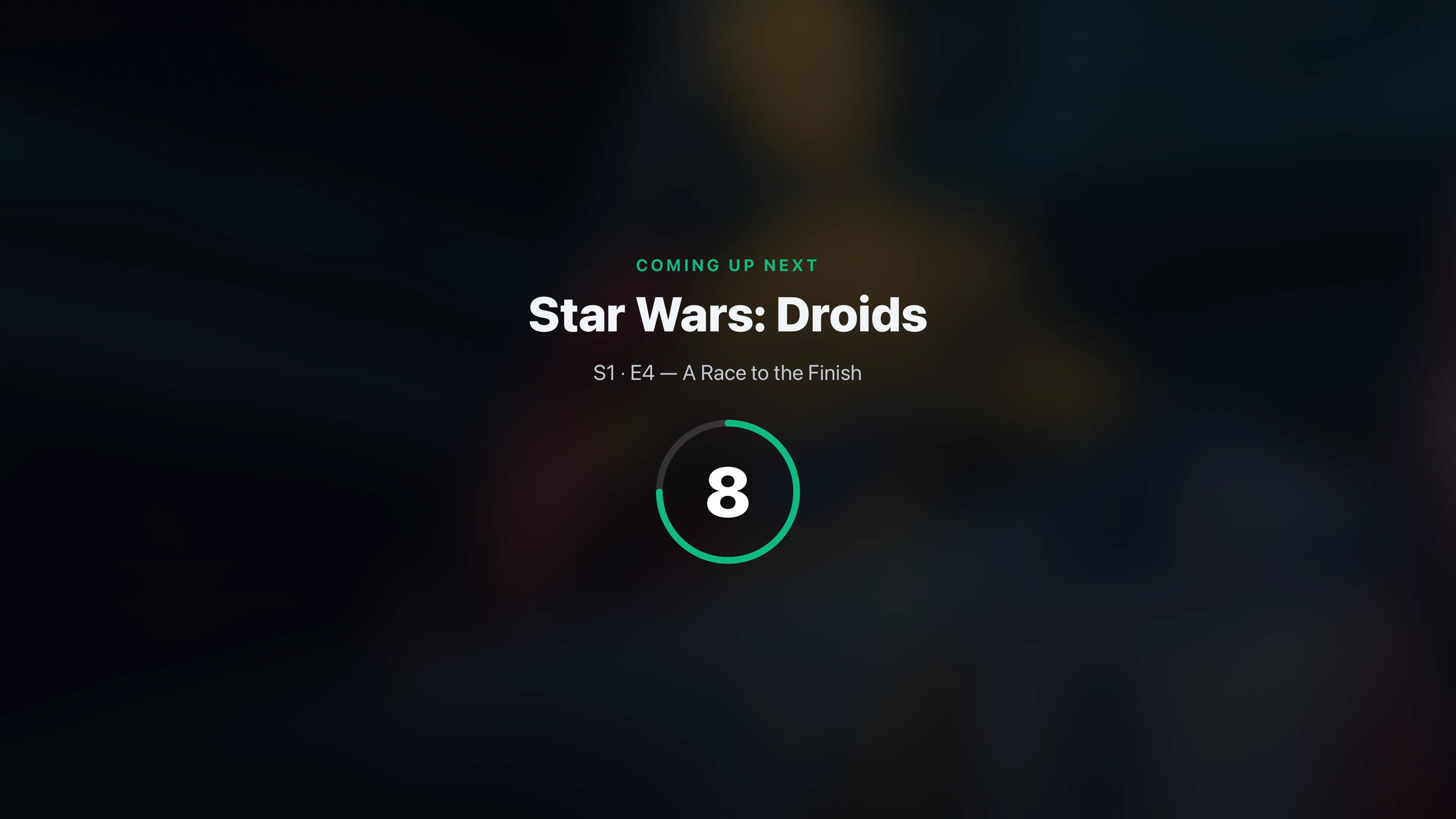
A real 10-foot experience.
The viewer app is a proper couch-and-remote TV app: an Aurora channel-guide grid, a glass player with a DVR scrubber, channel up/down, and the “Up Next” bumper card. The same app across platforms, delivered as a native binary or a browser player.
Built for a big screen and a remote, deliberately not a phone UI.
Features
Everything a channel needs.
Not a media browser, a channel you leave on. All of it runs from your own Plex, on your own hardware.
A real channel guide
A grid guide you surf like cable, always-on channels on one continuous, deterministic timeline everyone sees in sync.
Bumpers & music
“Up Next” cards and an optional ambient bed between programs.
Direct-play first
Plays your files natively; transcodes only when a device needs it.
Live offset + DVR
Join what's on now, scrub back through the buffer, restart, or roll into an earlier program. You just can't skip ahead of live.
Self-hosted & private
Runs on your hardware. No telemetry, nothing phones home.
Per-user access
Share whole packages or specific channels, enforced per viewer.
Build channels fast
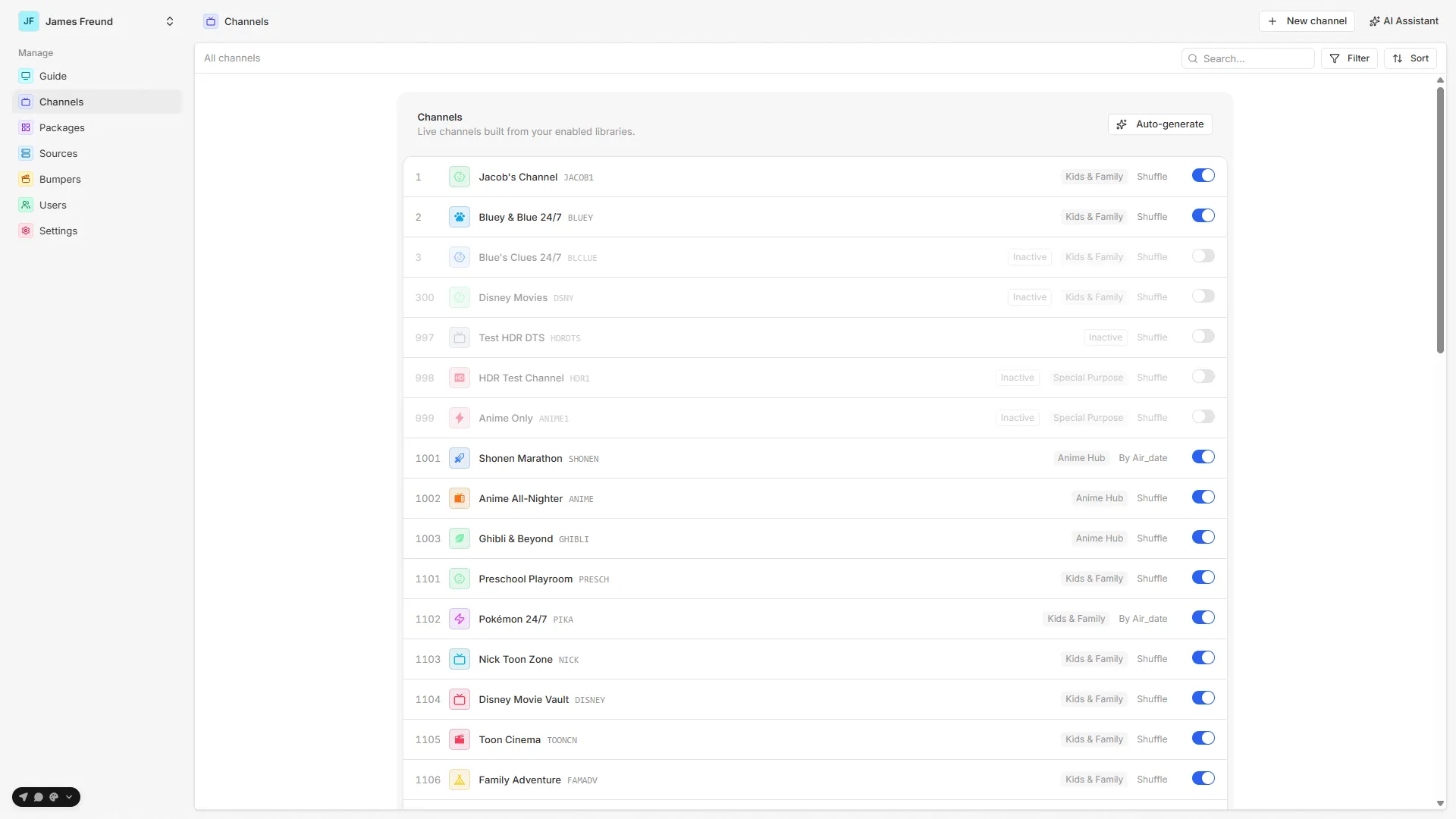
Author from metadata filters, auto-generate a whole lineup, or let a bring-your-own-key AI assistant draft one.
& much more
Build entire lineups with AI, a built-in AI assistant, AI run observability, live session tracking, one synced guide every viewer shares, remote and relay playback, and more shipping regularly.
See all features →Platforms
Built for the living room.
One app on every big screen, and a three-step path from your library to a channel you leave on.
Works on most platforms.
10-foot native apps for the living room, plus a browser player you serve from the same stack, the same app everywhere.
Three steps to live TV.
Connect Plex
Sign in with Plex once, enable your libraries, and sync metadata into Airwave's cache.
- 2
Build channels
Filter your library into channels (“90s comedies”, “all Studio Ghibli”), laid onto a continuous timeline.
- 3
Tune in
Open a TV app, sign in, and channel-surf your library like it's live cable, at home or on the road.
Design your lineup, then forget about it.
Build channels from filters, group them into packages, share them per-viewer, and let the scheduler keep every channel running deterministically, no babysitting.
Turn your library into a channel you leave on.
Free, self-hosted, and yours. Deploy the server, connect Plex, and start surfing.